
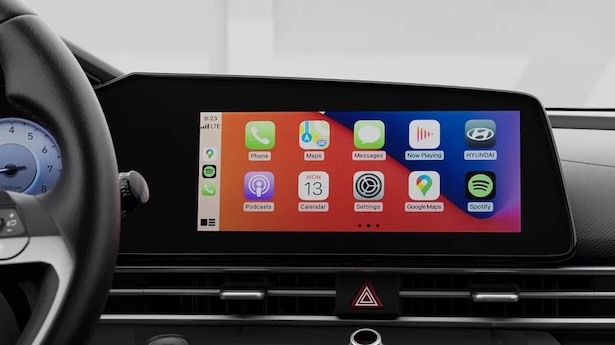
Wireless Apple CarPlay and Android Auto come standard across a growing range of Hyundai vehicles, including the 2026 Hyundai Palisade, 2026 Hyundai Santa Fe, and 2026 Hyundai IONIQ 5 across all trim levels. Compact models like the 2026 Hyundai Elantra also feature wireless connectivity on entry trims. Hyundai vehicles equipped with the newer ccNC infotainment system include wireless smartphone integration standard on their 12.3-inch touchscreen displays.
Hyundai has progressively expanded wireless phone projection to make modern cabin tech accessible without extra cords or clutter. On earlier generations, wireless connectivity was primarily found on base and mid-level models equipped with the 8-inch Display Audio unit. However, with the rollout of the ccNC infotainment system (connected car Navigation Cockpit), Hyundai brought wireless integration to its flagship 12.3-inch touchscreen displays as well. That means three-row family vehicles like the 2026 Hyundai Palisade feature wireless Apple CarPlay and Android Auto as standard equipment from the entry trim upward, with no optional package required.
For commuters merging onto I-271 in Bedford, having navigation and streaming apps mirror automatically to the dashboard screen makes daily driving smoother and safer. Drivers can access real-time traffic, send voice text messages, and control media apps using hands-free voice commands.
If you are exploring current models or want to test out smartphone projection features in person, you can visit our Bedford showroom location or give our team a quick call at (440) 745-7476 to check feature availability on specific vehicles.
Which Hyundai Trims Include Wireless Apple CarPlay and Android Auto Standard?
Base and mid-level Hyundai trims with the 8-inch Display Audio screen, as well as all trim levels featuring the 12.3-inch ccNC touchscreen, include wireless Apple CarPlay and Android Auto standard. For example, every trim of the 2026 Hyundai Palisade and 2026 Hyundai Santa Fe provides wireless smartphone integration out of the box. On sedan models like the 2026 Hyundai Elantra, wireless projection comes standard on the Essential and Preferred trims.
Understanding how Hyundai distributes smartphone features across trim levels helps narrow down the right model for your budget. On legacy systems, upper trims featuring a 10.25-inch navigation system required a wired USB connection due to internal software design, while entry trims with the smaller 8-inch Display Audio system supported wireless operation. Hyundai solved this distinction with its latest vehicle generation by embedding wireless capabilities directly into the ccNC infotainment system.
Buyers comparing options across model years will notice distinct configuration patterns:
- 2026 Hyundai Palisade: Wireless Apple CarPlay and Android Auto are standard on all trims via the standard 12.3-inch touchscreen.
- 2026 Hyundai Santa Fe: Every trim features standard wireless phone projection on the 12.3-inch ccNC touchscreen.
- 2026 Hyundai IONIQ 5: All-electric crossover equipped with standard wireless smartphone integration across the full trim lineup.
- 2026 Hyundai Elantra: Wireless phone projection is standard on Essential and Preferred trims; Preferred with Tech Package, Luxury, and N Line trims use wired projection or dedicated navigation inputs.
Commuters test-driving new Hyundai models usually ask whether wireless smartphone projection is included on the standard trim or if it requires upgrading to an optional technology package. Our sales team helps buyers compare these cabin tech features across both brand-new models and our quality pre-owned Hyundai inventory to ensure you get the exact features you want.
How Does Wireless Apple CarPlay Compare to Wired Apple CarPlay in a Hyundai?
Wireless Apple CarPlay eliminates cable clutter by automatically connecting your phone via Bluetooth and Wi-Fi as soon as you start the engine, offering quick daily convenience. Conversely, wired Apple CarPlay provides continuous battery charging through the primary USB data port and delivers slightly faster touch response times. Both formats display identical interface graphics, app layouts, and voice-command functions on the touchscreen.
Choosing between wired and wireless projection comes down to daily driving habits and battery preferences. Wireless integration relies on an initial Bluetooth handshake followed by a 5GHz Wi-Fi connection to transmit high-resolution video and audio data to the dashboard screen. This hands-free setup means you can leave your phone in a pocket, purse, or backpack during short trips around town.
For drivers heading into downtown Cleveland during rain or snow, voice-guided navigation through wireless Apple CarPlay allows you to keep both hands on the wheel and eyes on the road. However, running GPS navigation and wireless streaming simultaneously generates heat and consumes phone battery. Pairing wireless projection with Hyundai's available wireless device charging pad balances convenience with battery replenishment on longer drives.
Key comparisons between the two formats include:
- Connection Speed: Wireless connects automatically within 10 to 15 seconds of starting the vehicle; wired connects instantly upon plugging in the USB cable.
- Battery Management: Wired projection charges your smartphone continuously; wireless projection consumes battery power unless paired with a charging pad.
- Signal Stability: Wired connections are immune to external radio interference; wireless connections rely on stable Wi-Fi signals within the cabin.
- Cable Management: Wireless eliminates loose cords around the center console; wired requires an approved USB data cable.
Shoppers evaluating late-model trade-ins or exploring our certified pre-owned Hyundai models can test both wired and wireless setups during a test drive to experience the user interface firsthand.
How Can You Make a Wired Hyundai Apple CarPlay Connection Wireless?
Aftermarket wireless adapters allow Hyundai owners to upgrade their wired Apple CarPlay systems to wireless functionality without replacing the entire infotainment unit. Once paired via Bluetooth and Wi-Fi, the adapter communicates wirelessly with your phone while sending the CarPlay signal to the vehicle screen.
Converting a wired setup is a straightforward process that requires no permanent vehicle modifications or complex tools. These small USB adapters receive power from the vehicle's data port and create an internal Wi-Fi hotspot inside the vehicle cabin specifically dedicated to smartphone projection.
To install a wireless adapter in a wired Hyundai system, follow these steps:
- Locate the vehicle's primary USB data port (usually marked with a phone or USB icon near the front console).
- Plug the wireless CarPlay adapter into the USB data port using the supplied cable.
- Open Bluetooth settings on your iPhone and select the adapter's broadcast name.
- Confirm the Bluetooth pairing request and tap "Use CarPlay" when prompted on your phone screen.
- Allow the adapter to establish a Wi-Fi connection with your phone; the Hyundai screen will display the Apple CarPlay dashboard within a few seconds.
After initial setup, the adapter connects automatically whenever you enter the vehicle with your phone's Bluetooth and Wi-Fi turned on. If you are preparing to purchase a vehicle and want to estimate monthly payments or structure your trade-in value, our team offers an easy online financing application to streamline the purchasing process before you arrive.
Can Older Hyundai Models Receive a Software Update for Wireless CarPlay?
Vehicles built with Hyundai's newer ccNC infotainment architecture are capable of receiving over-the-air (OTA) software updates to enable wireless Apple CarPlay and Android Auto. Older legacy systems with 10.25-inch navigation screens cannot be upgraded to wireless operation via software updates because their underlying hardware lacks the necessary internal Wi-Fi routing architecture.
Software updates can refine system stability, update built-in navigation maps, and enhance touchscreen performance, but they cannot add physical hardware components to older vehicles. Legacy 10.25-inch infotainment systems were engineered with a hardware separation between the built-in navigation module and the wireless receiver. Because those units lacked the required 5GHz Wi-Fi hardware channel for projection, they remain wired-only systems regardless of software updates.
By contrast, vehicles built on the ccNC platform feature updated hardware modules that support both wired and wireless protocols. Hyundai has deployed software updates to unlock wireless functionality on select ccNC-equipped models that originally shipped with wired connection settings.
Drivers interested in accessing native wireless smartphone integration without aftermarket dongles often decide that upgrading to a current vehicle model is the most seamless solution. Browsing our latest new Hyundai inventory allows you to compare current trim levels and experience the latest built-in connectivity tech.
Common Questions About Hyundai Wireless Smartphone Integration
Q: Are there extra subscription fees to use wireless Apple CarPlay on Hyundai vehicles?
No, wireless Apple CarPlay and Android Auto are free built-in features on Hyundai vehicles and do not require any monthly or annual subscription fees. Smartphone projection uses your phone's existing cellular data plan for navigation, music streaming, and voice assistant features. You do not need an active Bluelink subscription to use smartphone integration on your vehicle touchscreen.
Q: Can you switch between wired and wireless CarPlay in a Hyundai?
Yes, you can switch to a wired connection at any time by turning off Wi-Fi or Bluetooth on your phone and plugging your device directly into the primary USB data port using an approved cable. Using a direct USB cable is helpful on long road trips when you want fast battery charging alongside stable projection performance.
Q: How do you set up wireless Apple CarPlay in a Hyundai?
To set up wireless projection, enable Bluetooth and Wi-Fi on your smartphone, navigate to Setup on the Hyundai touchscreen, select Phone Connections, and tap Add New. Select your phone from the vehicle screen menu, confirm the Bluetooth pairing passkey on your device, and accept the prompt allowing Apple CarPlay permission. Once saved, the vehicle connects automatically upon ignition.
Q: Why did older Hyundai models with larger navigation screens only offer wired CarPlay?
Older Hyundai models with 10.25-inch navigation screens used a proprietary Hyundai software interface that relied on a wired USB data connection for projection. Meanwhile, entry trims with 8-inch Display Audio screens used a different hardware architecture developed with third-party software that integrated early wireless projection. Hyundai unified these systems with the introduction of its newer ccNC infotainment system.
Q: Does using wireless Apple CarPlay drain your smartphone battery faster?
Wireless projection uses continuous Bluetooth and Wi-Fi data transfers alongside active GPS tracking, which consumes more phone battery power than standard Bluetooth audio streaming. To keep your battery charged during extended drives, pair wireless projection with Hyundai's available wireless device charging pad or plug into a high-speed USB charging port.
Prices and MSRP referenced in this article are estimates for informational purposes only and do not constitute an offer to sell. See dealer for complete details. Fuel economy estimates shown may differ from official EPA ratings and should not be relied upon as a guarantee of actual vehicle performance.


